Starting a travel blog is easy. Keeping it going and making it useful to readers is the real work. This guide covers the decisions that matter in the first month: your angle, your content plan, the structure of your site, and the travel features that turn a diary into a resource people bookmark.
Step 1: Choose an angle
“I travel and write about it” is a starting point, not an angle. Readers and search engines respond better to a clear focus:
- a region you know well (Southeast Asia, the American Southwest, the Balkans)
- a style of travel (budget, slow travel, road trips, family travel, solo female travel)
- an interest (food, hiking, photography, digital nomad life)
A narrow angle makes it easier to rank, easier to write, and easier for readers to know why they should come back.
Step 2: Plan three types of content
- Stories. Personal trip reports with photos. They build connection.
- Guides. “Three days in Lisbon”, “How to get from the airport to downtown”. They bring search traffic.
- Practical tools. Itineraries, budgets and packing lists. They get bookmarked and shared.
Aim for a mix. Stories alone rarely bring new readers from search; guides alone feel impersonal.
Step 3: Set up WordPress
- Choose a domain that fits your angle and is easy to say out loud.
- Use reliable hosting with HTTPS and daily backups.
- Install a travel theme, a backup plugin and an SEO plugin.
- Create your main pages: About, Start Here, Destinations, Contact.
The Start Here page is underrated. It tells new visitors who you are and points them to your best posts.
Step 4: Organize destinations
Use categories for continents or countries and tags for themes such as “budget” or “hiking”. Keep the structure shallow: two levels are usually enough. A destination page for each country, linking to every post about it, helps readers and search engines alike.
Features that make a travel blog useful
A travel map
An interactive map of the countries you have visited is both a fun visual and a navigation tool: click a country, see the posts.
Itineraries
Day-by-day plans with places, travel times and tips. Readers copy them almost directly into their own plans.
Budgets
A clear breakdown of what a trip cost (stay, food, transport, activities) is one of the most requested things on travel blogs.
Packing lists
Simple checklists for a destination or season. Easy to write, often shared.
Destination guides with local time and weather
A guide page that shows the local time and current weather saves readers a search and keeps them on your page.
Building it with Voyager
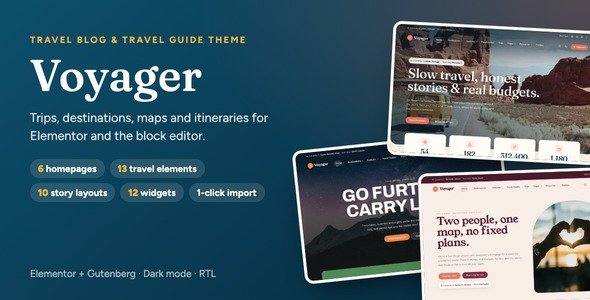
Voyager is our travel blog and travel guide WordPress theme for solo travelers, couples and travel creators. You can build pages with Elementor and write stories in the block editor; the same travel features work in both.
- 6 demo homepages, one-click full website import
- 13 travel features as Elementor widgets and Gutenberg blocks
- Interactive travel map with visited countries
- Trip itineraries, budgets and packing lists
- Destination guides with live local time and weather
- 10 single story layouts
- 12 sidebar widgets
- Dark mode, RTL ready, translation ready
You can explore the map and the itinerary blocks on the Voyager demo.
Photography for travel blogs
Your photos are your proof that you were there and the main reason people stay on your posts. A few habits make a big difference:
- Shoot horizontal and vertical versions of key scenes; vertical images work well for social sharing.
- Resize before uploading. Full camera files slow your site down for no visible gain.
- Use descriptive file names (“lisbon-tram-28-alfama.jpg”, not “IMG_4821.jpg”).
- Write alt text that describes the scene. It helps visually impaired readers and image search.
- Add a short caption with the place name. Readers love knowing exactly where a photo was taken.
Making money, honestly
Many travel bloggers eventually earn from their site through affiliate links (hotels, tours, gear), display ads, sponsored trips or their own guides. Whatever you choose, disclose it clearly, recommend only what you would use yourself, and keep the reader’s trip at the center of every post. Trust is the asset that makes every other income stream work.
Writing a destination guide that ranks
Search for your destination and read the top results. Then write something more useful: more recent, more specific, with your own photos and practical details such as transport, costs and opening hours. Structure the guide with clear headings (where to stay, what to do, how to get around, how much it costs) and update it after every visit.
Who this is for
Voyager suits:
- new and growing travel bloggers who want guides and tools, not just a photo journal
- couples and families documenting trips
- travel creators who also want a polished portfolio of their work
Look elsewhere if you:
- want a minimal journal with almost no features (see blog themes for writers)
- run a booking business such as a tour operator or hotel; a booking-focused theme will serve you better
Growing a travel blog
- Publish consistently. One solid guide a week beats five rushed posts in a month.
- Update old guides. Prices, opening hours and transport change. Add an “Updated” date.
- Use your own photos. They are your proof that you were there.
- Build an email list early, even if you only send a monthly update.
- Link between posts. Every guide should link to related guides and to the destination page.
When you are ready to go live, use our WordPress launch checklist. If your travel content grows into a full publication with many writers, see how to launch a news or magazine site.
Pricing
Voyager costs $29 for one site on fekbd.com, with a lifetime licence and one year of support. It is included in the All-Access Bundle with every other FEKBD theme, template and plugin.
Common mistakes new travel bloggers make
Writing diary posts only
“What I did on day three” posts are lovely for friends and family, but few strangers search for them. Mix personal stories with practical guides that answer real questions, such as how to get from the airport or how many days to spend somewhere.
Huge, slow photos
Uploading photos straight from the camera makes pages slow, especially on mobile data abroad. Resize images before upload and let WordPress serve smaller versions.
No clear way to find old posts
After fifty posts, readers need help finding things. Organize by destination and by trip type, and link related guides together.
Giving up too early
Travel blogs often take many months before search traffic grows. Plan for at least a year of steady publishing.
A simple publishing schedule
| Content type | How often |
|---|---|
| Destination guide | Twice a month |
| Practical tip or how-to | Twice a month |
| Personal story or photo essay | Once a month |
| Update an old post | Once a month |
Tools that help on the road
- A cloud folder for photos so nothing is lost if a phone is stolen.
- A notes app where you write details while they are fresh: prices, opening hours, transport tips.
- An offline map app so you can check locations without data.
- A simple spreadsheet listing every post, its destination and when you last updated it.
Before you publish each guide
- Check that prices and opening times are clearly dated.
- Add a map or clear directions for every place you recommend.
- Make sure every photo has descriptive alt text.
- Link to at least two related posts on your blog.
Who this is not for
If you only want to share photos with friends and family, a social media account is easier than a blog. A travel blog makes sense when you want to build something lasting: guides that people find through search months or years after you publish them, and a site you fully own.
Staying safe and respectful
Do not publish your exact location in real time while you travel alone. Ask before photographing people, and be careful when writing about local customs so you describe them accurately and respectfully. Readers trust bloggers who are honest about both the good and the difficult parts of a trip.
Finally, back up your blog regularly, especially before a long trip. A backup stored outside your hosting account means a broken update or a lost password will never cost you years of guides and photos.
Frequently asked questions
Do I need Elementor to use Voyager?
Voyager’s travel features work as both Elementor widgets and Gutenberg blocks, so you can write stories in the block editor and use Elementor for page layouts.
Can I show the countries I have visited on a map?
Yes. Voyager includes an interactive travel map with visited countries.
How often should a new travel blog publish?
Consistency matters more than volume. One well-researched guide a week is a good, sustainable pace for most new bloggers.
Can I translate my travel blog?
Voyager is translation ready and RTL ready, so it works with translation plugins and right-to-left languages.