


Both an HTML template and a WordPress theme give you a finished design. The difference is what happens after launch: who edits the site, how often it changes, and who maintains it. Choose an HTML template when a developer controls the site and content changes rarely. Choose a WordPress theme when non-technical people will publish and edit regularly. The rest of this guide explains the trade-offs in detail.
What each one is
An HTML template is a set of static files: HTML pages, CSS, JavaScript and images. You edit the files in a code editor and upload them to any web host. There is no database and no admin dashboard.
A WordPress theme is the design layer of a WordPress site. Content lives in a database and is edited in the WordPress dashboard, often with a page builder such as Elementor. The theme controls how that content looks.
Side-by-side comparison
| HTML template | WordPress theme | |
|---|---|---|
| Who edits content | Developers | Anyone with a login |
| Editing method | Code editor | Dashboard and page builder |
| Hosting | Any static host | PHP and MySQL hosting |
| Speed | Very fast by default | Fast with care and caching |
| Security upkeep | Very little | Regular updates needed |
| Blog and frequent updates | Manual | Built in |
| Plugins and extensions | Write your own code | Thousands of plugins |
| Best for | Landing pages, company sites, prototypes | Blogs, stores, sites edited by teams |
When an HTML template is the better choice
- The site rarely changes. A company profile, an event page or a product launch page.
- A developer owns the site. Edits go through someone comfortable with code.
- You need maximum speed with minimal upkeep. Static files are fast and have very little attack surface.
- You are building on another stack. HTML templates are a starting point for a React, Vue, Laravel or other front end.
- You need a prototype or design system. A large template is a ready library of sections and components.
When a WordPress theme is the better choice
- People without coding skills will edit pages.
- You publish often: news, blog posts, case studies.
- You need features from plugins: forms, shop, memberships, SEO tools, multilingual.
- The client wants control after you hand the project over.
Hidden costs to consider
HTML templates: every content change needs a developer. Forms need a server-side script or a third-party service. Adding a blog later means either a static site generator or moving to a CMS.
WordPress themes: hosting is slightly more involved, and you must keep WordPress, the theme and plugins updated. Plugins add weight if you install too many.
Neither is “better”. The right choice depends on who will run the site after launch.
Kova: a multipurpose HTML template
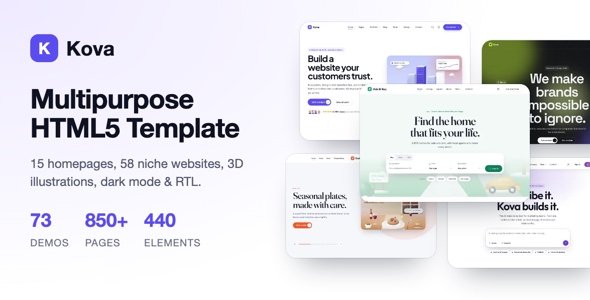
Kova is our multipurpose HTML5 template, built on Bootstrap 5.3, SCSS and vanilla JavaScript, with no jQuery.
- 73 demos: 15 Kova Main homepages and 58 complete niche websites
- 850+ HTML pages: About, Services, Portfolio, Blog, Shop, Account and more
- Library: 82 headers, 54 navigations, 44 footers, 148 sections and 440 element variants
- 3D SVG illustrations that follow your brand colors
- Dark mode, RTL and 8 color presets on every page
- Tabbed mega menus, sticky sidebars, sliders and soft GSAP motion
- Working PHP contact and newsletter forms (Mailchimp ready)
- Node build tool and step-by-step documentation
Browse the demos on kova.fekbd.com.
A quick decision guide
Answer these four questions:
- Will someone without coding skills edit the site after launch? If yes, choose a WordPress theme.
- Will you publish new content every week? If yes, choose a WordPress theme.
- Is the site mostly fixed pages that a developer maintains? If yes, an HTML template is a strong choice.
- Are you building on another framework or stack? If yes, an HTML template gives you a design to port.
If your answers are mixed, consider both: a static HTML marketing site for speed, and a WordPress blog on a subfolder or subdomain for content that changes often.
Hosting and deployment
HTML templates can run on almost any host, including static hosting and content delivery networks, often at very low cost. Deploying is as simple as uploading files or pushing to a repository. WordPress needs PHP and a database, regular updates and backups, but managed WordPress hosting takes much of that work off your hands.
Maintenance over time
Think about year two, not just launch day. With an HTML template, your ongoing cost is developer time for every change. With WordPress, your ongoing cost is updates, backups and occasional plugin licences. Neither is free; pick the one that matches who will look after the site.
Who this is for
Kova suits:
- front-end developers and agencies building company, agency, SaaS or portfolio sites
- teams that need a large component library as a starting point for another framework
- anyone who wants a fast static site with little maintenance
It is not the right tool if:
- your client wants to edit pages without code; choose a WordPress theme instead, for example with FEKBD Addons Pro for Elementor
- you need a blog with frequent posts managed by non-developers
If you choose WordPress instead
Pick a theme made for your industry rather than a generic one; the content structure matters more than the colors. Our guides to clinic websites and school websites show what an industry theme includes. For dashboards and web apps, see what to check in an admin dashboard template.
Pricing
Kova costs $19 on fekbd.com, with a lifetime licence and one year of support. It is included in the All-Access Bundle, which also contains all our WordPress themes and plugins, useful if your projects need both.
Common mistakes when choosing between the two
Picking WordPress for a site nobody will edit
If a developer will make every change anyway, the WordPress dashboard adds hosting needs and updates without much benefit. A static HTML site may be simpler.
Picking HTML for a site with a busy blog
If someone will publish posts every week, editing HTML files will get old quickly. A content management system pays for itself here.
Forgetting about forms
Static sites need a form service or a small backend to handle contact forms. Plan for it before launch rather than after the first message is lost.
Underestimating updates
WordPress sites need plugin and core updates. HTML sites need far fewer, but any change still needs a developer. Count both kinds of cost.
Decision table
| Your situation | Better fit |
|---|---|
| Developer-led landing page or product site | HTML template |
| Client wants to edit pages themselves | WordPress theme |
| Very high traffic, mostly static content | HTML template |
| Frequent blog posts by non-developers | WordPress theme |
| Online store with many products | WordPress theme with WooCommerce |
Moving from one to the other later
Neither choice is permanent. Many teams start with an HTML template for a fast launch and move to WordPress when the content team grows. If you think that might happen, keep your content well organized from the start: clear page structure, consistent headings and images stored in one folder. That makes a future migration much easier.
Questions to answer before you decide
- Who will make content changes in the first year, and how often?
- Do you need user accounts, a store or a members area?
- Where will the site be hosted, and who will maintain it?
- How important is the lowest possible hosting cost?
Who this is not for
If you need a full web application with user accounts, payments and a database, neither a plain HTML template nor a standard WordPress theme is the whole answer. You will need a framework and a development team, though a template can still speed up the design of your public pages.
A practical example
Imagine a small software company launching a new product. The developers want a fast landing page, a pricing page and a contact form within a week, and nobody on the team writes blog posts yet. An HTML template fits well. A year later, the company hires a marketer who wants to publish weekly articles and run landing pages for campaigns without asking developers. At that point, moving to WordPress makes sense.
Whichever way you go, write down the reasons for your choice. When the project grows or the team changes, that short note helps everyone understand why the site was built the way it was.
Frequently asked questions
Can I convert an HTML template into a WordPress theme?
Yes, but it is development work: splitting pages into theme templates and connecting content to WordPress. If you need WordPress, starting with a WordPress theme is usually faster.
Is an HTML template faster than WordPress?
Static HTML is very fast by default because there is no database or PHP processing. A well-built WordPress site with caching can also be fast.
Do Kova’s forms work without extra services?
Kova includes working PHP contact and newsletter forms, so you need hosting that runs PHP. The newsletter form is Mailchimp ready.
Can I use Kova with React or another framework?
Kova is built with Bootstrap 5.3, SCSS and vanilla JavaScript, so its markup and styles can be used as a starting point in other front-end frameworks.