WordPress runs a large share of the web’s publishing sites, from local newsrooms to niche magazines. It handles the hard parts of publishing well: drafts, editors, scheduling, categories and archives. What you need to add is a front page that changes every day, layouts made for news, and a plan for ads and newsletters. This guide covers the decisions to make before launch and the tools to make them easier.
Decide what kind of publication you are
- Local news: town or city coverage, events, public notices.
- Niche news: one topic in depth (tech, crypto, gaming, sports, auto, health).
- Magazine: fewer, longer pieces, strong imagery, features and interviews.
- Personal publication: one writer, news-style layout.
The answer shapes your homepage. Local and niche news need many fresh headlines above the fold. A magazine needs big images and fewer, stronger stories.
Plan your sections
Pick 6 to 10 sections and assign each to a category. Each section gets its own archive page and a block on the homepage. Avoid creating a category for every topic you might cover one day; empty sections look abandoned.
Build an editorial workflow
WordPress roles map well to a newsroom:
- Contributors write drafts but cannot publish.
- Authors publish their own posts.
- Editors publish and edit everyone’s posts.
- Administrators manage the site.
Use scheduled publishing to spread stories through the day, and add an author box on every article. Readers trust named writers.
Homepage elements that work
- Breaking news ticker for the latest headlines
- Lead story block with a large image
- Section blocks, one per category
- Trending and most popular lists
- Newsletter signup in a visible spot
- Ad placements that do not push the lead story below the fold
Ads, paywalls and newsletters
Plan revenue before launch, because it affects layout:
- Display ads: decide placements (header, in-article, sidebar) and keep them consistent.
- Paywall or memberships: limit some content to subscribers.
- Newsletter: the most reliable way to bring readers back. Start collecting emails on day one.
- Podcasts: a natural extension for many niche publications.
Speed matters more for news
News readers come from search and social, often on mobile data. Heavy homepages lose them. Choose tools that load only the CSS and JavaScript each page uses, compress images, and keep the number of plugins small.
Two ways to build it
Option 1: A complete news theme (NewsOn)
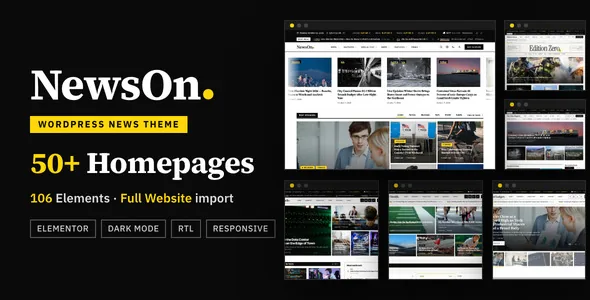
NewsOn is our newspaper and magazine theme for Elementor: a fast, black-and-white design with one yellow accent.
- 50+ homepages in 10 news categories
- Full website import in one click
- 106 Elementor elements made for news
- Header Builder with 20+ presets and a mega menu; Footer Builder with 12 presets
- 20 single post designs and 16 blog and archive layouts
- Ads, paywall and memberships
- Dark mode, RTL and translation ready
- Page-scoped CSS and JS, Theme Options with live preview, child theme included
See it on the NewsOn demo.
Option 2: Keep your theme, add Paperboy
Paperboy is our news and magazine plugin for Elementor. It works with any theme, so you can keep a lightweight theme such as Hello Elementor and add newsroom elements on top.
- 76 news and magazine elements for Elementor
- Post grids, sliders, lists and magazine blocks
- Breaking-news ticker, trending and popular posts
- Live blog, reader polls and single-post parts
- Ad Manager with ad groups and automatic in-story placements
- Newsletter, paywall and podcast blocks
- Per-page asset loader: only the elements used load their files
See it on the Paperboy demo.
| NewsOn (theme) | Paperboy (plugin) | |
|---|---|---|
| Best when | Starting a new news site | Adding news layouts to an existing theme |
| Homepages | 50+ | Built from 76 elements |
| Header and footer builders | Included | Use your theme’s |
| Ads | Included | Ad Manager with in-story placements |
| Price on fekbd.com | $29, 1 site | From $29, one-time |
Writing headlines and articles that work online
News readers decide in seconds. Strong online news writing follows a few rules:
- Put the news in the headline. Specific beats clever.
- Answer who, what, when and where in the first paragraph.
- Use short paragraphs and subheadings for longer stories.
- Add a featured image to every article; it appears on the homepage, in archives and on social media.
- Link to earlier coverage of the same story so readers can catch up.
- Update developing stories and note the time of the update.
Corrections and trust
Publish a corrections policy and follow it. When you fix a factual error, note the correction at the end of the article. Readers are more forgiving of a corrected mistake than a silent one, and a visible policy signals that your publication takes accuracy seriously.
Growing your audience
Search and social bring first-time readers; newsletters bring them back. Offer a daily or weekly newsletter with your best stories, place the signup form on every article, and keep the email short. For niche publications, a podcast or live blog during big events can build a loyal audience quickly.
Who this is for
Choose NewsOn if you are launching a new publication and want everything, from header to single post, designed for news.
Choose Paperboy if you already like your theme, or you build news sites for clients on different themes.
Look elsewhere if you want a quiet personal blog: see blog themes for writers. If you want readers to submit stories, see how to build a viral masonry blog.
Launch checklist for publishers
- Publish at least 20 articles across your sections before announcing.
- Set up Google Search Console and submit your sitemap.
- Add author pages with bios.
- Write About, Contact, Corrections and Privacy pages.
- Test the homepage on a mid-range phone on mobile data.
- Go through our full WordPress launch checklist.
Pricing
NewsOn costs $29 for one site on fekbd.com, with a lifetime licence and one year of support. Paperboy starts at $29 for one site, with 5-site and unlimited licences available. Both are included in the All-Access Bundle.
Common mistakes when launching a news site
Launching with an empty site
A news site with five articles looks abandoned. Publish at least thirty articles across your main sections before you promote the site.
Too many sections
Every section needs regular stories. Start with four or five sections you can keep fresh, and add more when you have the writers.
Ads before readers
Heavy ad placements on a new site slow pages down and push readers away before you have an audience. Start light, and add placements once traffic grows.
No corrections policy
Mistakes happen in every newsroom. A visible corrections policy and a habit of updating stories openly build more trust than pretending errors never happen.
Roles in a small newsroom
| Role | WordPress role | What they do |
|---|---|---|
| Editor in chief | Administrator or Editor | Final approval, homepage, policy |
| Section editor | Editor | Edits and schedules stories |
| Reporter | Author | Writes and publishes own stories |
| Contributor | Contributor | Submits drafts for review |
A daily editorial routine
- Morning: review overnight drafts and update the homepage lead stories.
- Midday: publish the main stories of the day and share them on social media.
- Afternoon: update developing stories with time-stamped changes.
- Evening: schedule tomorrow’s early stories and send the newsletter.
Measuring what matters
Page views alone can mislead. Track returning visitors, newsletter sign-ups and time spent on articles. These show whether readers trust you enough to come back, which matters more for a news site than a single viral story.
Who this is not for
Large newsrooms with dozens of daily stories, live blogs, paywalls and custom apps usually need an engineering team and custom infrastructure. A WordPress news theme fits independent publishers, local news sites, niche magazines and small teams that want to publish fast without building a platform from scratch.
Building a newsletter from day one
Search and social traffic can change overnight. A newsletter list is an audience you control. Add a simple sign-up form under every article and on the home page, send a short digest of the week’s best stories, and keep it consistent. Even a small list of loyal readers is valuable for a growing publication.
Finally, test your site on a slow mobile connection the way many readers will see it, and check that the latest stories appear on the home page within seconds of publishing. Speed and freshness are what readers notice first on a news site, long before they notice the design.
Frequently asked questions
Is WordPress good for a news website?
Yes. WordPress handles drafts, editorial roles, scheduling, categories and archives well. A news theme or plugin adds the homepage and article layouts.
Do I need Elementor Pro for NewsOn or Paperboy?
No. NewsOn includes its own header and footer builders, and Paperboy works with free Elementor.
Can I run ads on my news site?
Yes. NewsOn supports ads, paywall and memberships, and Paperboy includes an Ad Manager with automatic in-story placements.
Will Paperboy work with my current theme?
Paperboy works with any WordPress theme and is tested with Hello Elementor.