A school website serves more audiences than almost any other site: prospective students, parents, current students, staff, alumni and the local community. Each group wants something different, and most arrive on their phone. This guide explains what an education website needs, how to structure it, and how to build it with Elementor without writing code.
Start with your audiences
List who visits and what they need:
- Prospective students and parents: programs, fees, admissions steps, deadlines, campus life.
- Current students: calendar, timetables, announcements, clubs.
- Staff and faculty: a profile page and a place for department news.
- Alumni and community: events, news and ways to get involved.
Your main menu should serve the first group. Admissions is the page that brings new students; everything else supports it.
The pages every education site needs
Programs
A program page should answer: what you will learn, how long it takes, entry requirements, cost, and what comes next. If you offer many programs, add a finder with filters (level, subject, format) and a way to compare two programs side by side.
Admissions
Explain the steps in order, list required documents and deadlines, and offer an online application. Applicants should be able to upload documents and receive status emails, so they are not left wondering.
Academic calendar and timetables
Term dates, exam periods, holidays and events. An ICS export lets families add dates to their own calendars, which reduces “when is…” emails to your office.
Faculty
Photos, roles, departments and short bios. Parents and students like to know who teaches.
Campus life
Clubs, athletics, events and a campus map. This is where a school’s personality shows.
Online learning (optional)
If you run online courses, you need a learning management system (LMS) for lessons, quizzes and student dashboards. Tutor LMS is a popular WordPress option; make sure your theme styles it so it does not look like a separate site.
Structure for different institutions
| Institution | Focus pages |
|---|---|
| University or college | Program finder, faculties, admissions, research news |
| K-12 school | Calendar, parents’ information, staff, events |
| Preschool | Daily routine, safety, enrollment, gallery |
| Language school | Course levels, schedules, placement test, fees |
| Online academy or bootcamp | Course catalog, outcomes, LMS, payment |
| Music and arts school | Instructors, lessons, performances, enrollment |
Building it with Campora
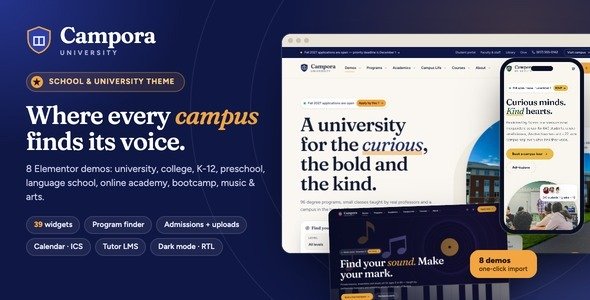
Campora is our school and university WordPress theme for Elementor. It is built to run a campus website, not just a homepage.
- 8 demo homepages: university, college, K-12, preschool, language school, online academy, bootcamp, and music and arts
- Program finder and side-by-side program compare
- Admissions application with document uploads and status emails
- Academic calendar with ICS export, and class timetables
- Faculty, clubs, athletics, events and an interactive campus map
- Optional Tutor LMS support: courses, lessons, quizzes and dashboards styled to match
- Every page editable in Elementor, with Campora Templates for single and archive layouts
- Midnight dark mode and RTL ready
You can try the program finder and admissions form on the Campora demo.
Admissions: the page that pays for the site
Admissions is where a school website earns its keep, so give it extra care:
- Show the steps as a numbered list, from enquiry to enrollment.
- List every required document, with formats and size limits.
- Show deadlines prominently, and update them every term.
- Explain fees and financial aid clearly, or link to where they are explained.
- Offer an online application with document uploads, so families do not need to print and scan.
- Send status emails at each stage, so applicants are never left guessing.
- Give a contact person for questions, with a name and a direct email.
Keeping the site current
Education websites go stale quickly: last year’s calendar, last term’s news, staff who have left. Assign one person to own each section (news, calendar, staff, admissions) and set a monthly reminder to check it. A small, accurate site is better than a large, outdated one.
Accessibility is not optional
Schools serve students and parents with a wide range of needs, and many institutions have legal accessibility obligations. Use real headings, descriptive link text, alt text for every image, captions for videos, and color contrast that is easy to read. Test the main pages with a keyboard only. Choose a theme that is built with accessibility in mind, and keep checking as you add content.
Who this is for
Campora suits:
- schools, colleges and universities that want to manage their own website
- language schools, bootcamps, online academies and arts schools
- agencies and freelancers building education sites for clients
It is not the right tool if you need:
- a full student information system (grades, attendance, billing); a website is the public face, not the records system
- deep integration with a specific existing campus system; check the documentation and plan custom work if so
Tips for a better school website
- Put deadlines on the homepage during admissions season.
- Write for parents as well as students: clear fees, safety and contact details.
- Keep news fresh. An old “latest news” section makes the whole site look abandoned.
- Test on a phone. Most parents will check the calendar on their phone.
- Make accessibility a habit: alt text on images, readable contrast, logical headings.
Before launch, run through our WordPress launch checklist. If you also build for healthcare clients, see how to build a clinic website in a day.
Pricing
Campora costs $29 for one site on fekbd.com, with a lifetime licence and one year of support. It is also included in the All-Access Bundle with every other FEKBD theme, template and plugin. Elementor-based sites can be extended further with FEKBD Addons for Elementor Pro.
Common mistakes on school and university websites
Organizing by department instead of by visitor
Visitors do not know your internal structure. A parent looking for term dates should not need to know which office publishes them. Organize the main menu around what people come to do: apply, learn about programs, check dates, contact.
Burying admissions
Admissions information is the most valuable content on the site. Link to it from the header, the home page and every program page.
Publishing PDFs instead of pages
PDFs are hard to read on phones and hard for search engines to understand. Keep PDFs for printable forms and put the actual information on normal pages.
Letting news go stale
A news section where the latest post is a year old suggests the school is inactive. Publish something small every week or two, or remove the news block from the home page.
Who should own which pages
| Section | Suggested owner |
|---|---|
| Admissions and fees | Admissions office |
| Programs and courses | Each department head |
| News and events | Communications or one named staff member |
| Staff directory | Human resources or administration |
Give each owner a WordPress account with the right role, so updates do not all depend on one person.
A launch plan in four weeks
- Week 1: Import the closest demo, set brand colors and logo, build the menu.
- Week 2: Write admissions, programs and contact pages with real content.
- Week 3: Add staff profiles, events and the first news posts.
- Week 4: Test on phones, check accessibility basics, collect feedback from a few parents and students, then launch.
If you plan to sell courses online later, keep that in mind when you plan your menu, so there is a clear place for it to go.
Who this is not for
Large universities with dozens of faculties, their own student systems and strict IT policies usually need a custom build or a multisite network managed by an internal team. A ready-made Elementor theme is a better fit for schools, colleges, training centers and smaller institutions that want a professional site without a long agency project.
Measuring whether the site works
Track a few simple numbers each term: how many people visit the admissions pages, how many start an enquiry or application form, and how many finish it. If many people start the form but do not finish, shorten it. If few people reach admissions at all, make the links to it more prominent on the home page and program pages.
Finally, invite a few parents, students and staff to try the site before launch. Ask each of them to find one thing, such as term dates, the fees page or a teacher’s contact details, and watch how they search. Wherever they struggle, adjust the menu labels or add a link from the home page.
Frequently asked questions
Do I need Tutor LMS?
Only if you run online courses. Campora works on its own for programs, admissions, calendars and faculty. Tutor LMS support is optional.
Can applicants upload documents?
Yes. Campora’s admissions application accepts document uploads and sends status emails.
Can I add school dates to my phone calendar?
The academic calendar includes ICS export, so dates can be added to Google Calendar, Apple Calendar or Outlook.
Is Campora only for universities?
No. It includes 8 homepage designs, from preschool and K-12 to language schools, bootcamps and music schools.